Microwave Editor Version 5.7.7

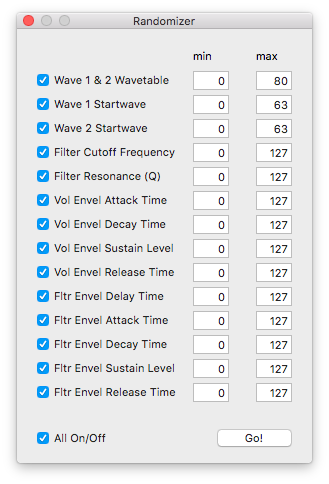
In the sound edit window it is now possible to set a bunch of parameters to random values:
Wave 1 & 2 Wavetable, Wave 1 Startwave, Wave 2 Startwave, Filter Cutoff Frequency, Filter Resonance (Q), Vol Envel Attack Time, Vol Envel Decay Time, Vol Envel Sustain Level, Vol Envel Release Time, Fltr Envel Delay Time, Fltr Envel Attack Time, Fltr Envel Decay Time, Fltr Envel Sustain Level and last not least, Fltr Envel Release Time.
MW2E Version 5.3.0

MW2E is now distributed as two separate programs: MWAV for the Microwave 1 and MW2E for the Microwave 2.

Main features include:

Completely redesigned sound editor interface and program bank manager with drag&drop support.

  • A Sound Bank can be opened, for instance “mwsset1.syx” and all sounds can be dumped to the Microwave afterwards.
  • A new Sound Bank library can also be set up.
  • Individual slots in the Sound Bank can be initialized.
  • Sounds can be drag&dropped from the Sound Bank to the Microwave.
  • Sounds can be drag&dropped from the Microwave to the Finder.
  • Sounds can be drag&dropped from the Finder to the Sound Bank.
  • The Microwave table can be updated by selecting either “Request all sounds” or “Request Sound” (for the current selected row).
  • “Edit sound” opens a window for editing a Sound Program.

MWAV for the Microwave 1 can be downloaded here:
http://12decode.de/MW2E/downloads/MWAV.dmg
After installing the new version, the registration key has to be re-entered.

MW2E for the Microwave II/XT can be downloaded here:
http://12decode.de/MW2E/downloads/MW2E.dmg

(The latter may also be updated from inside the  application).

MW2E Version 5.2.6

Main Feature: Microwave I user tuning and velocity tables

User velocity tables T1/T2 (T3/T4 if a memory card is installed) are available as multi program parameter. User tuning tables can be selected either for a sound program or as multi program parameter. It is possible to reset all these tables to reasonable values (proportional in/out velocity relations resp. key-pitch and flattened zero detune) to have a nice starting point.

Registered users can update by selecting the “Check For Update” menu item.

MW2E Version 5.2.0

Apart from a few bug fixes, version 5.2.0 offers the possibility to update the application to future releases directly from the Main menu (registered users only).

Other new features in this version are:

  • Application is now build as 32/64-bit Intel fat binary.
  • Popover Buttons for MIDI controller assignments in Global Parameter section and Multi Program window.
  • Popup buttons with Volume Envelope Macros to change a bunch of parameters on the fly.
  • Filter Envelope Macros with similar functionality for Organ, Strings and other preset sounds.
  • Reorganized sliders and better redesigned interface.

[Download link]